
Google Assistant / AI Product Strategy /2018 SVA-Sponsored Studio with Google When Should AI Step In?
Designing proactive AI that reduces coordination work while keeping people informed, confident, and in control.
Functional front-end prototype using simulated AI behavior.
PROJECT TYPE
AI product strategy, conversational UI, cross-service decision support
CONTEXT
Sponsored studio project with Google through SVA MFA Interaction Design in 2018
TEAM
3 interaction design fellows with critique from a Google Interaction Designer
ROLE
I translated research data into actionable insights, then used them to define the product strategy, AI design principles, and interaction framework.
CORE SKILLS
AI product judgment, research synthesis, UX strategy, user stories, concept prototyping
This concept video demonstrates the assistant’s role across a user’s day: recognizing meaningful signals, connecting context across services, suggesting a next step, and keeping the user in control before taking action.
THE OPPORTUNITY
A simple request revealed a bigger problem
The future of an assistant was not about answering more commands. It was about knowing when to help people move forward.Imagine trying to schedule one call with friends in three countries. The intent begins in a message thread, availability lives in several calendars, and the decision turns into a loop of time-zone math and back-and-forth replies.
AI is most useful when users face uncertainty, too many options, or repetitive coordination.
At the time, personal assistants could set a reminder or search the web, but they could not carry this kind of task across tools. Our research showed that people were not asking for a more conversational interface. They were asking for less coordination work.


That insight shifted our ambition: from designing a better command interface to designing an assistant that could recognize context, propose a path forward, and earn permission before acting.
DISCOVER
“Many of us are receiving so many emails that we can never read them all, and it’s overwhelming our ability to do our work. Therefore, it is easy to miss an important message.”
“People in our lives these days live in different countries and time zones, so it’s really hard to figure out what time fits us well to meet online. Usually, I have to ‘negotiate’ with my friends”
What people actually needed
We began with field research and informal interviews around a broad question: what does a digital assistant mean to people? As we mapped routines and pain points, two patterns kept resurfacing.
Fragmentation created invisible work. Users had to remember what happened in one tool while deciding what to do in another.
Context was the price of usefulness. People expected assistance to understand enough of the situation to help, but not to act beyond what they intended.
The product opportunity was not unlimited automation. It was well-timed support at moments of coordination.
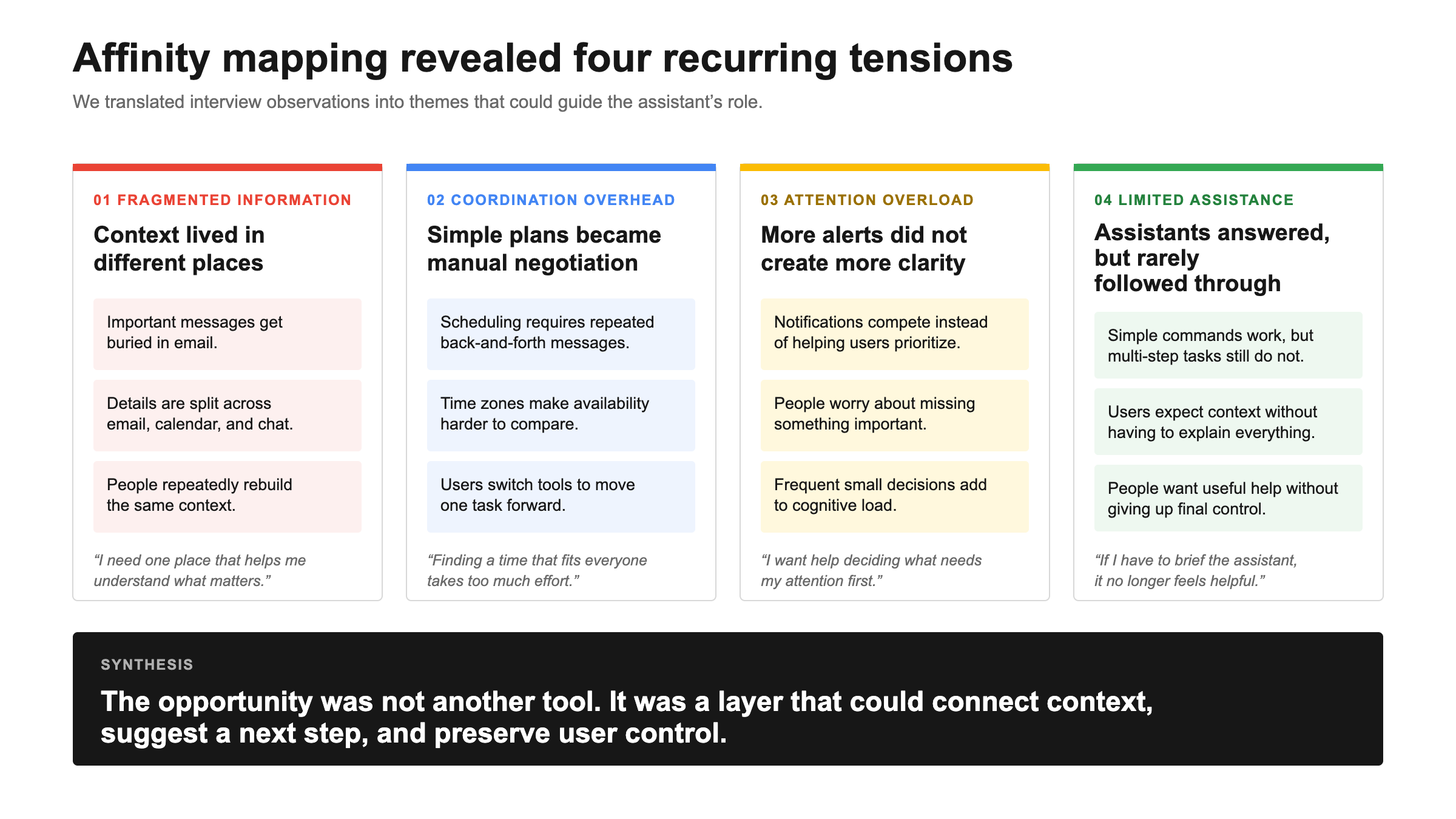
Identified and grouped different pain points and behaviors
DEFINEThe friction lived between products
No single app was broken. The burden came from stitching several of them together.People already had capable email, calendar, messaging, and search tools. Yet completing one everyday task still meant carrying context from one service to the next.
Important messages get buried in email.
Calendar coordination requires back-and-forth negotiation.
Notifications compete for attention without helping users prioritize.
Assistants answer simple commands but rarely help users complete multi-step tasks.
The original brief asked how personal digital assistants might help people manage future routines. We made the opportunity more precise:
How might an assistant reduce decision fatigue by connecting fragmented context, suggesting the next best step, and helping users act across services?
FRAMEWORK
Where AI earns its place
We drew a boundary around the intelligence
Before designing screens, we defined where AI would meaningfully reduce effort and where a familiar interface would remain better.
Before designing screens, we drew a boundary around the intelligence. AI had to reduce real effort, not become the interface by default.
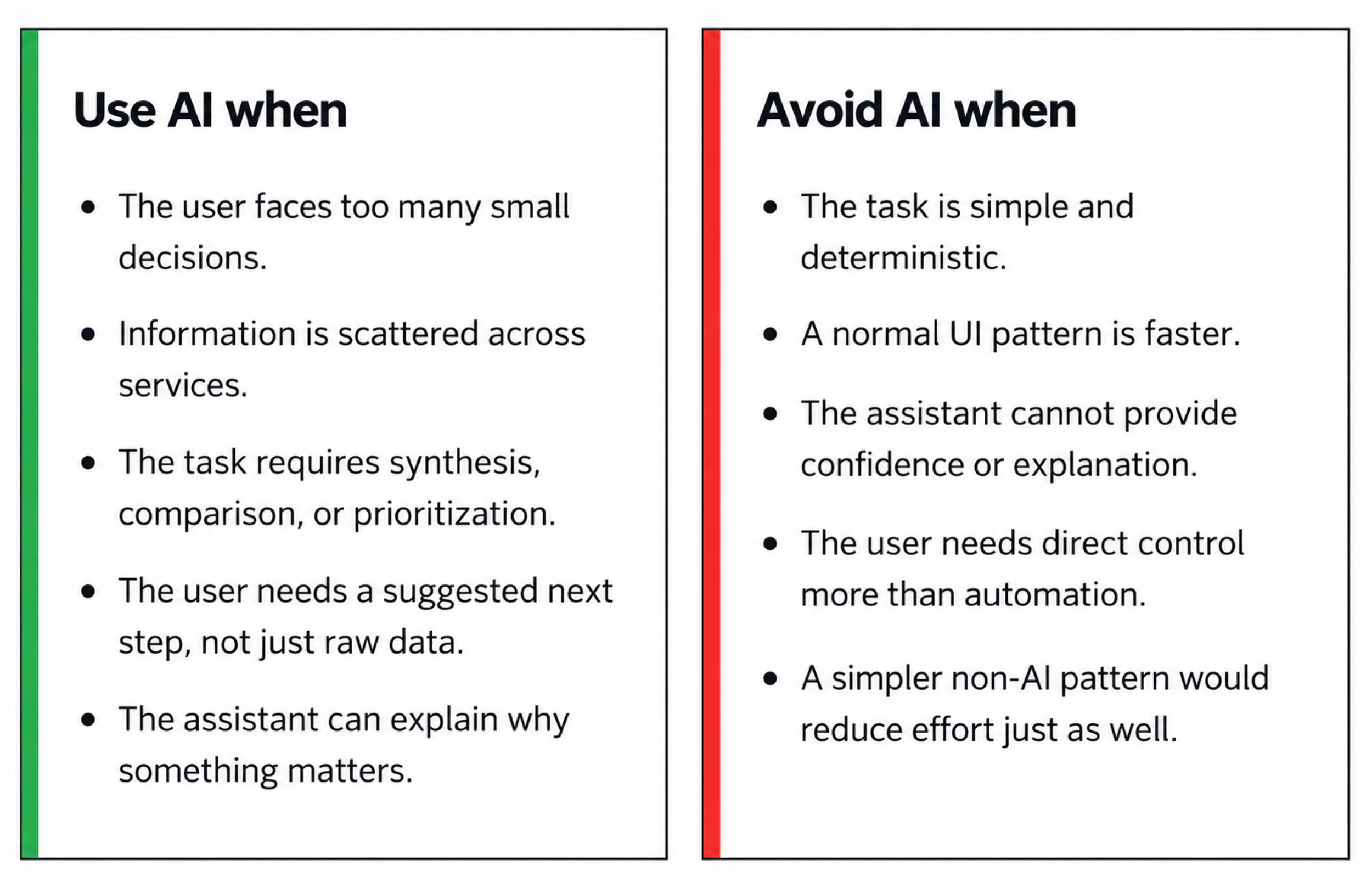
This became our central principle: AI should act as a co-pilot, not an autopilot.
Personalized
• Dress up according to occasion/festival

• Name your assistant, personalize face, hair and clothes
Emotion/Tone

Proactive

Suggestive

STRATEGY
Turn scattered signals into one clear next step
The assistant would not replace email, calendar, or messaging. It would connect them at the moment a user needed to move a task forward.
For a cross-time-zone group call, the assistant recognizes intent in a conversation, compares relevant availability, proposes viable times with a short explanation, and prepares a message for review.
The value appears across the sequence: signal, context, suggestion, control, action, and feedback.
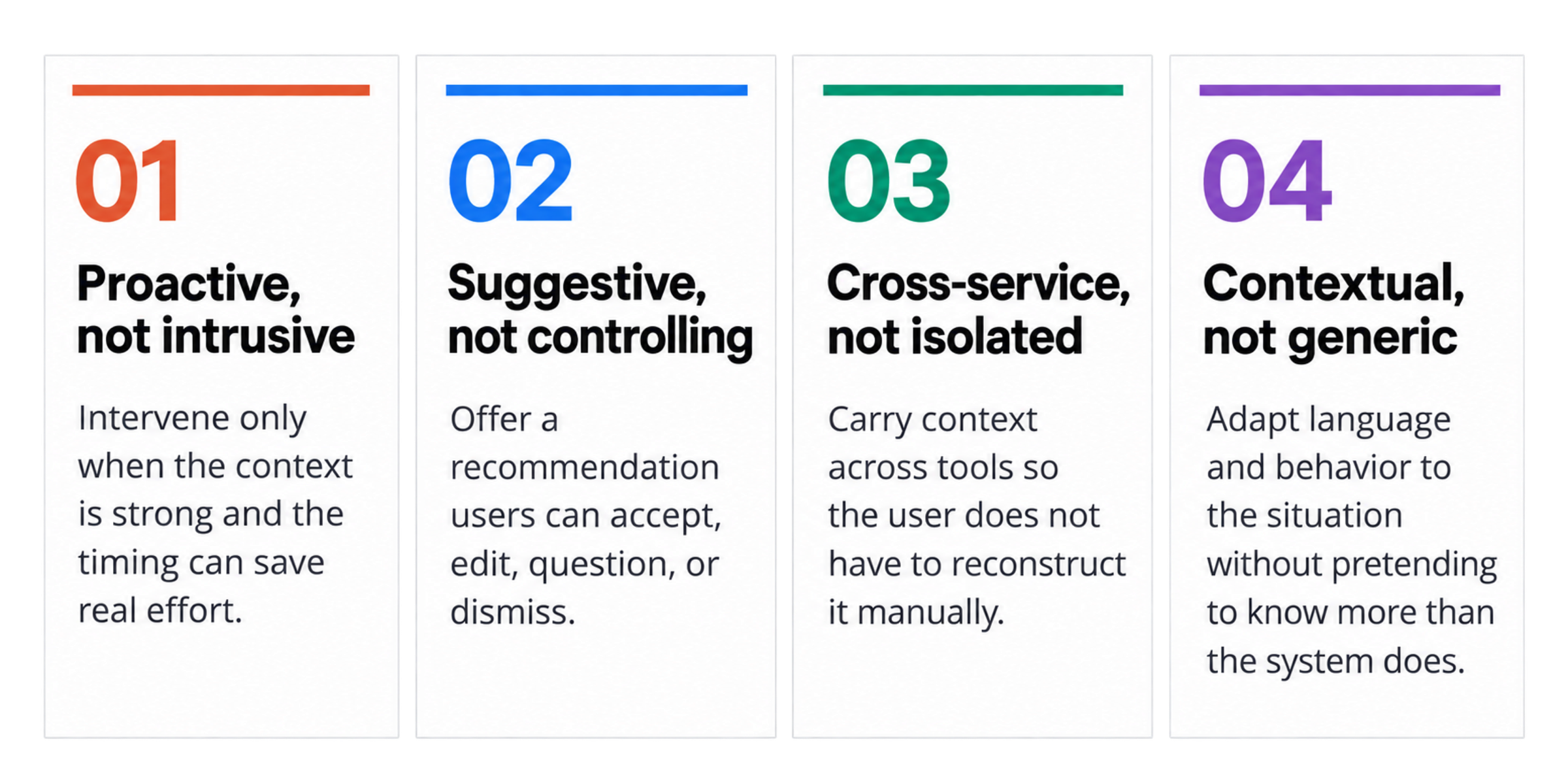
Design principles
PROTOTYPE
One group call, without the coordination spiral
We used a storyboard because the value of AI appears across a sequence, not on a single screen. Every handoff followed the same UX framework: signal, context, suggestion, control, action, and feedback.
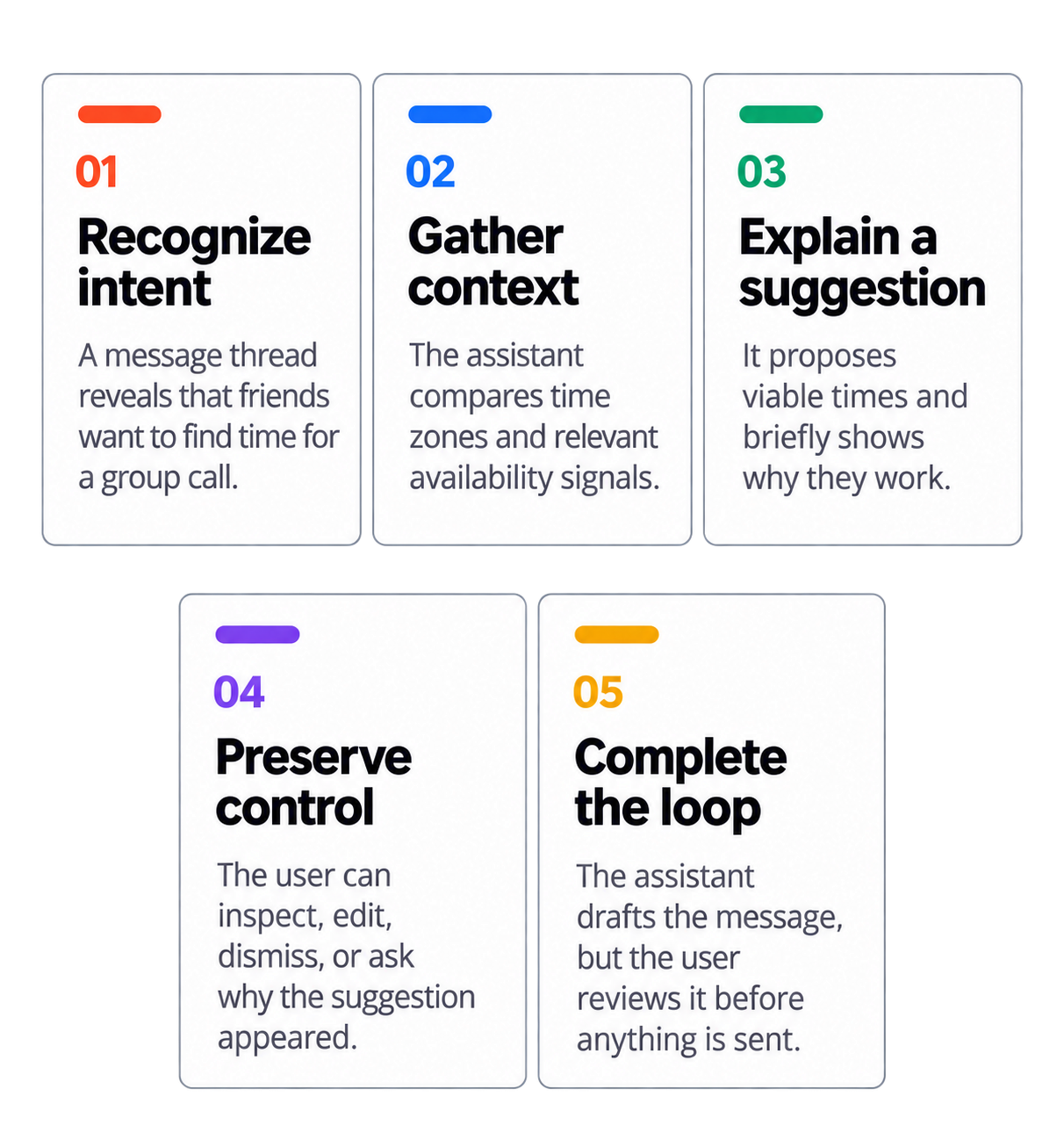
STORYBOARD


REFLECTION
What I would test today
I would build a functional prototype around uncertain states, visible reasoning, user edits, confirmation, and graceful fallback. I would compare it with simpler patterns such as grouped notifications, availability views, templates, and rules-based reminders.
Success would be measured through task completion, time saved, suggestion acceptance, user confidence, edits before sending, and dismissal rate.
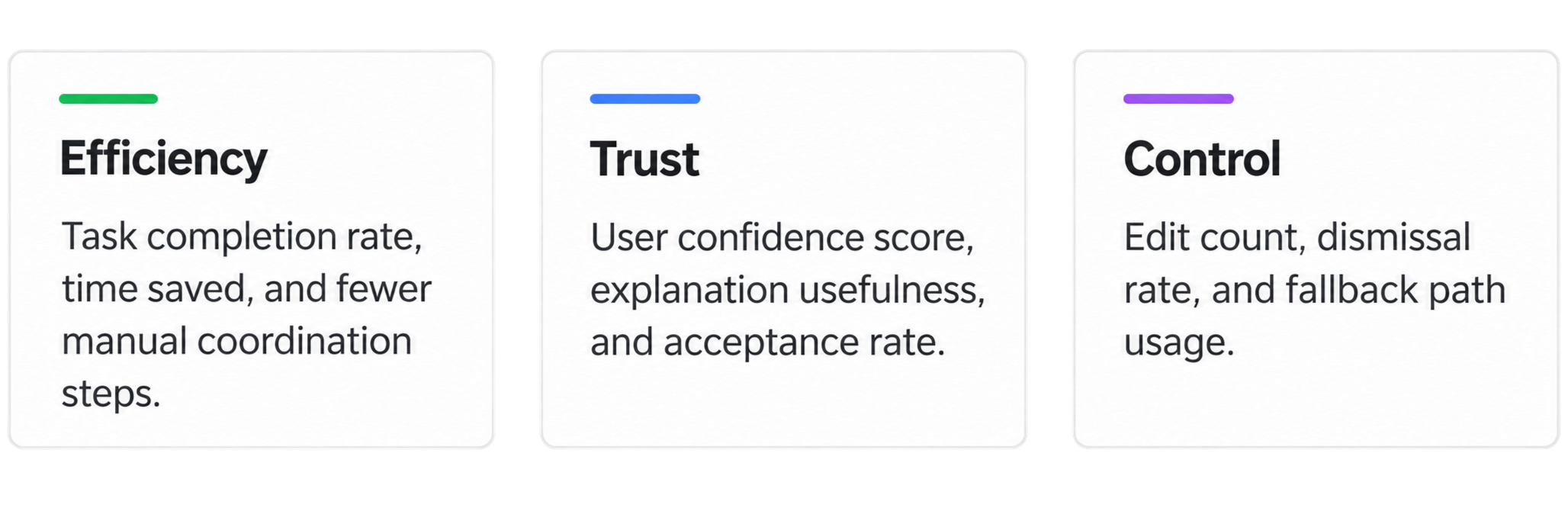
The question is not whether AI can do the task. It is whether AI reduces cognitive load more than a simpler product pattern.